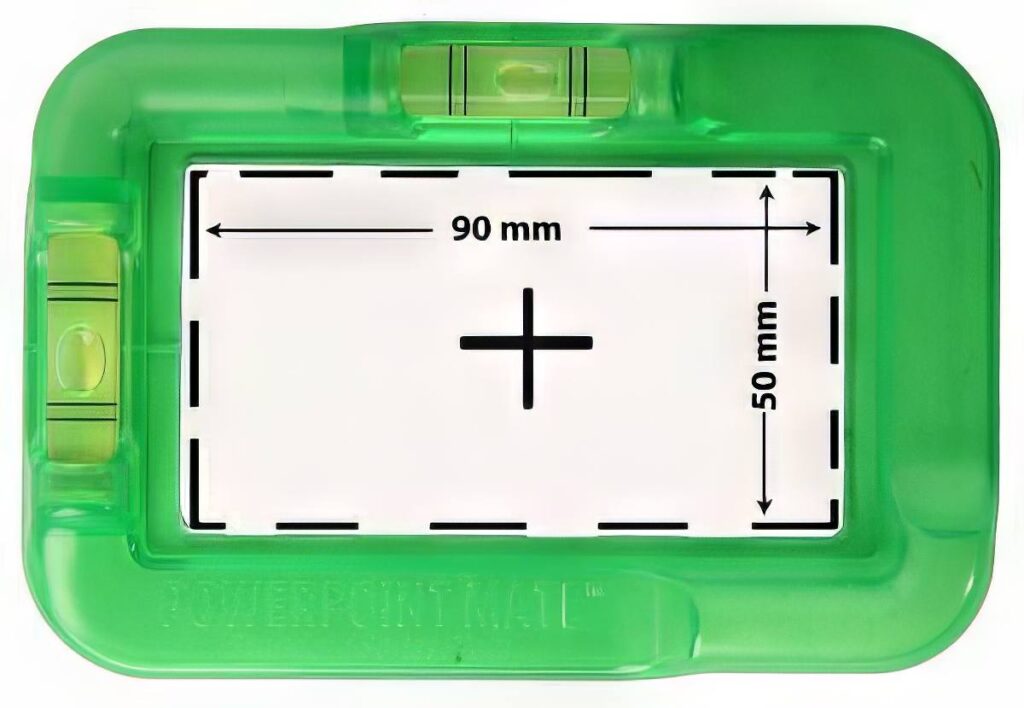
If you’ve ever installed a power point and stepped back only to notice it’s slightly off level — you know that sinking feeling. A few millimetres off can make an entire wall look wonky. That’s where the PowerPoint Mate Level Template comes in.
This clever tool takes the guesswork out of installation, helping electricians cut, align, and install power points with perfect precision. Whether you’re wiring a new build or replacing old fittings, accuracy is everything — and this simple device guarantees i
How the PowerPoint Mate Level Template Works
The PowerPoint Mate power-point levelling template is designed to make every cut-out and fitting exact.
Here’s how:
1. Measure
The template outlines the exact cut-out dimensions.
2. Level
Built-in spirit level ensures straight installation every time.
3. Mark & Cut
Trace the shape and cut confidently knowing it’s perfect.
4. Install
Align the power point with your markings and fit it snugly.
PowerPoint Level Template: Why Every Electrician Needs On

Why Use a PowerPoint Level Template Instead of a Tape and Eye-Guessing
Even seasoned electricians can get caught out by uneven wall surfaces or slight misjudgments. With the PowerPoint Level Template, you eliminate:
Time wasted on re-cutting holes
Customer complaints about uneven fittings
The need for constant adjustments
You’ll also gain:
Consistent accuracy across every install
Faster job completion
A more professional finish
It’s a small tool that makes a big impact on your workflow.
Designed by an Electrician, for Electricians
Unlike generic templates, the PowerPoint Mate level template for power points was created by an Australian electrician who saw the same frustrations on every job. Built from durable, lightweight material, it’s compact enough for any toolbox and tough enough for daily site use.
You can tell it’s designed by someone who actually installs power points — because it solves all the real-world problems that electricians face.
Where to Get the PowerPoint Level Template
PowerpointMate is available now, shipped Australia-wide directly from the Gold Coast.
We make two versions to suit the most common Australian GPO profiles:
- Standard Series Plate — for standard-profile Australian power points
- Slimline Series Plate — for slimline-profile power points
Every template is built to last — compact enough for any toolbox and tough enough for daily trade use.
Get Perfectly Level Every Time
Never eyeball another install.
Buy your PowerPoint Mate today and make every job look like a showroom fit.
A PowerPoint Mate level template is a precision tool designed to help electricians mark, cut, and install power points perfectly straight. It includes built-in level bubbles and exact cut-out dimensions for a professional finish every tim
Simply position the template where you want the power point, check the bubble level to ensure it’s straight, and trace around the cut-out. Then, cut along the lines and install your power point confidently — knowing it’s perfectly level.
Traditional levels and tape measures can shift or be hard to align across multiple points. The PowerPoint Mate template combines both tools into one — giving you accuracy, speed, and consistency with every installation.
The PowerPoint Mate template fits standard Australian double and single GPOs. Its internal dimensions are designed to match the most common power point sizes used across Australia.
Yes — every PowerPoint Mate comes with a built-in spirit level to make alignment fast and foolproof. No need to juggle multiple tools while marking your cut-outs.
You can purchase directly from the official website at PowerPointMate.com.au. Orders ship Australia-wide with fast, trackable delivery.
Yes. Licensed electricians, wholesalers, and trade suppliers can request bulk pricing or reseller options by contacting the team through the Contact Page.
Yes. When aligning multiple power points, use the edge of the template as a straight guide. The built-in level keeps every outlet perfectly aligned, even over long runs.
Yes — the PowerPoint Mate is proudly designed and manufactured on the Gold Coast, Australia, supporting local trades and ensuring top-quality standards. (The bubble levels are purchased from a supplier in China and installed into our Australian made templates in Australia.)
A cutting guide provides measurements — a PowerPoint Mate adds precision. It ensures your measurements are level, straight, and aligned for a professional finish every time.